Address Poisoning – The Copy-Paste Crypto Scam Hiding in Your Wallet History
Address poisoning is one of the simplest crypto scams there is. It doesn’t hack your wallet, and it doesn’t need your recovery phrase. It just waits for you to copy the wrong address.
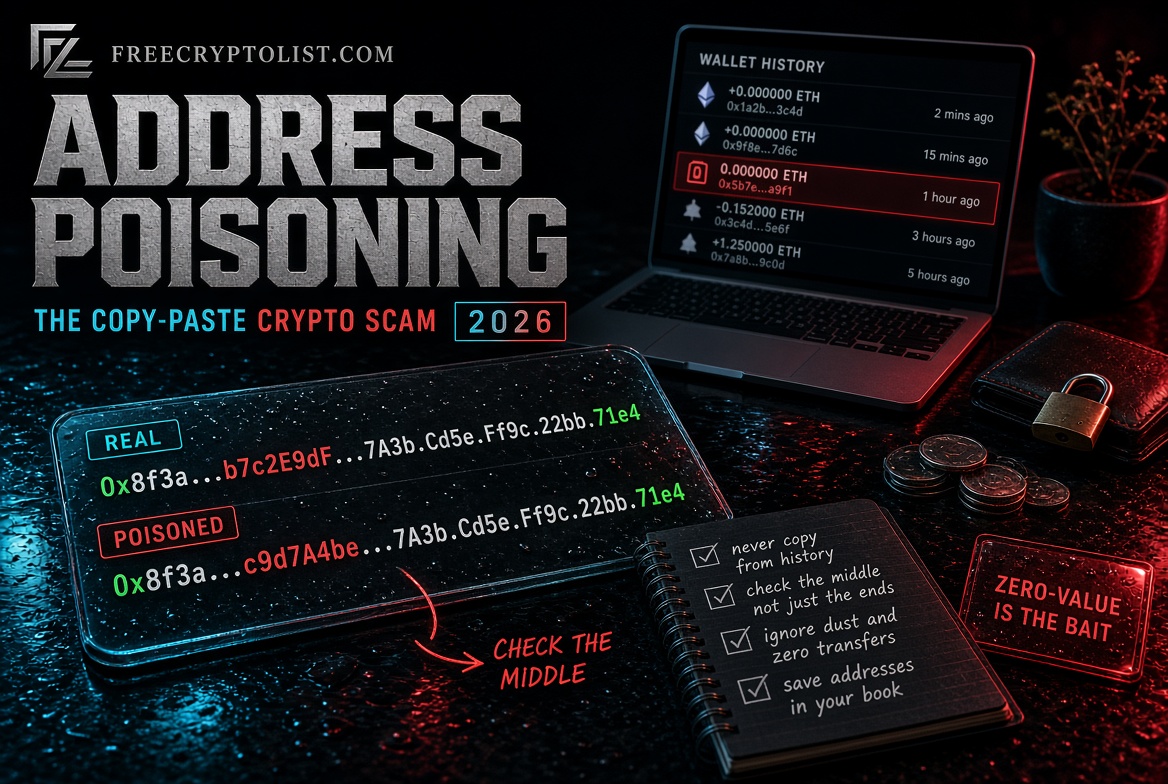
The short version: a scammer creates a wallet address that starts and ends with the same characters as one you use, then sends a tiny or zero-value transaction so that fake address shows up in your wallet history. The next time you copy an address from your history to send funds, you grab theirs instead. The money is gone the moment you hit send. The fix is just as simple: never copy addresses from your transaction history, and always check the middle of an address, not just the start and the end.
It sounds too basic to work. It isn’t. In December 2025, one person lost about $50 million this way. In January 2026, another lost about $12.25 million. Researchers have counted hundreds of millions of these attempts.
How Address Poisoning Works
Crypto wallet addresses are long strings of random-looking letters and numbers, like 0x7a3F...c91B. Nobody reads the whole thing. Most wallets and exchanges even shorten addresses in the display, showing only the first few and last few characters. Scammers built a whole scam around that habit.
Here’s how it plays out, step by step:
- You send a normal transaction. Say you move USDT from your wallet to your exchange account, or to a friend. That transaction is public on the blockchain, so anyone can see the address you sent to.
- Bots spot it. Automated programs watch the blockchain for transfers, especially larger ones.
- They generate a look-alike address. Using a “vanity address” generator, they create a new address that matches the first and last few characters of the address you just used. The middle is completely different, but that’s the part nobody looks at.
- They plant it in your history. The scammer sends a transaction between your wallet and the fake address. Now the look-alike sits in your activity list, right next to your real transactions.
- They wait. Next time you need to send to that same address, you open your history, see what looks like the familiar address, copy it, and send. The funds go straight to the scammer.
Blockchain transactions can’t be reversed. There’s no bank to call and no “undo” button.
The Three Kinds of Poisoning Transactions
Etherscan, the main Ethereum block explorer, describes three ways scammers get their fake address into your history. If you see any of these, it’s a warning sign, not a gift:
- Zero-value transfers. A transaction that moves 0 tokens. It costs the scammer only a small network fee, and it doesn’t need anything from you. It can even appear to come from your own wallet, which makes it look like a transfer you made yourself.
- Dust transfers. A tiny amount, like a fraction of a cent in USDT, USDC, or ETH, sent from the look-alike address to yours.
- Spoofed token transfers. Fake tokens with the same name and symbol as real ones, like a fake “USDT,” moved in a way that makes the look-alike address appear in your history.
Not every tiny deposit is a scam, but a small or zero-value transfer from an address that looks almost exactly like one you use is a very strong sign.
Important: the poisoning transaction itself doesn’t steal anything. Your wallet is not hacked, and your funds are still safe. The danger only starts if you later copy that address and send money to it.
Real Cases
$50 million in USDT, December 2025. A user was moving almost 50 million USDT. They did what many careful people do and sent a $50 test transaction first. Within minutes, the scammer created a look-alike address matching the first and last characters of the real one and planted it in the victim’s history with a dust transfer. The victim copied the fake address from that history and sent the full amount. The stolen USDT was swapped for ether and moved through multiple wallets, some of which later used the Tornado Cash mixer. The victim posted an on-chain message offering a $1 million bounty for the return of the funds.
Notice what happened there: the test transaction didn’t protect them. It actually helped the scammer, by showing exactly which address to imitate, right before the big transfer. A test only works if you copy the address from a trusted source for the main transfer too, not from your history.
About $12.25 million in ETH, January 2026. According to Scam Sniffer, another user lost about 4,556 ETH the same way, copying a poisoned address from their transaction history.
$68 million in WBTC, May 2024. A user sent about $68 million in Wrapped Bitcoin to a look-alike address after a poisoning transaction. This is one of the rare cases with a good ending: after investigators said they’d traced the attacker using IP and device data, nearly all of the funds were sent back within days. Don’t count on that. Most victims never see their money again.
How Common Is It?
A study presented at the USENIX Security Symposium in 2025 measured address poisoning on Ethereum and BNB Smart Chain over two years. The researchers found about 270 million poisoning attempts targeting about 17 million victims. Of those, 6,633 attempts succeeded, causing at least $83.8 million in losses.
That means most attempts fail. But the scam costs so little to run, and the rare successes are so big, that it’s worth it for scammers to keep spamming. Security firms have also linked a rise in poisoning on Ethereum to lower transaction fees after the network’s Fusaka upgrade in late 2025, which made mass campaigns even cheaper.
Who Gets Targeted
Anyone who has made a transfer can be targeted, but bots focus on:
- Wallets that move stablecoins like USDT and USDC
- Wallets that just made a large transfer
- People who regularly send to the same address, like moving funds between their own wallet and an exchange
You don’t need to be a whale. If you’ve ever opened your wallet and found a strange zero-value transaction or a few cents of a token you didn’t expect, you’ve already been targeted.
How to Protect Yourself
Every one of these habits is free and takes only a few seconds.
1. Never copy addresses from your transaction history
This one habit blocks the entire scam. MetaMask’s own advice is to avoid copying addresses from your history, even your own addresses. Instead, copy the address directly from the source each time: your exchange’s deposit page, your own wallet’s “Receive” screen, or a message from the person you’re paying, confirmed through another channel.
2. Save addresses you use often
Most wallets have an address book or contacts list. Save an address once, after you’ve checked it carefully, and send from there from then on. Exchanges have withdrawal address lists, often called “whitelists,” that work the same way. Turn that feature on if your exchange offers it.
3. Check the middle, not just the ends
Poisoned addresses are built to match the first and last characters. Compare a chunk from the middle too. Better still, compare the full address character by character for any large transfer.
4. Treat your test transaction properly
Test transactions are still a good idea. Just remember the lesson of the $50 million case: for the main transfer, copy the address again from the original trusted source, not from your history, and never from a transaction that appeared after your test.
5. Pay attention to wallet warnings
Wallets are adding protection. MetaMask, for example, compares the address you’re sending to with your history. If it closely resembles an address you’ve used, matching the first and last characters but different in the middle, it shows a blocking warning before you can send. It also warns you when you’re sending to an address you’ve never used before. Don’t click through these warnings out of habit. Stop and check.
6. Use a hardware wallet the right way
A hardware wallet shows the destination address on its own screen before you approve. That only helps if you actually compare it to the address from your trusted source. A hardware wallet will happily sign a transfer to a poisoned address if that’s the address you pasted in.
Bonus: ignore the junk
Don’t interact with strange tokens or tiny deposits that show up in your wallet. Don’t try to sell them, swap them, or send them back. Some show up with a link or a “claim” message. That’s a different scam leading to a wallet drainer. Etherscan hides zero-value transfers by default and flags spoofed tokens, which makes poisoning attempts easier to spot when you look up your address on Etherscan.
Do I Need to Do Anything If I’ve Been Poisoned?
If you’ve just found a zero-value or dust transaction from a look-alike address, and you haven’t sent anything to it, you’re fine. Your wallet hasn’t been hacked and your funds are safe. You don’t need to move your funds or create a new wallet. Just:
- Don’t send anything to that address, ever
- Save your real, verified addresses in your address book, if you haven’t already
- Hide or ignore the spam tokens if your wallet allows it
What to Do If You Already Sent Funds to a Poisoned Address
Act fast. Recovery is rare, but these steps give you the best chance:
- If you sent stablecoins like USDT or USDC, contact the issuer right away. Tether and Circle can freeze tokens in some cases, usually working with law enforcement.
- If the funds moved to an exchange, contact that exchange’s support through its official website or app. Exchanges can sometimes freeze stolen funds if they’re alerted in time.
- Report it to the FBI at ic3.gov, with the transaction hash, both addresses, the amount, and the time.
- Beware of “recovery experts” who contact you afterward. They’re almost always a second scam.
Our step-by-step guide, Scammed in Crypto? What to Do Next, covers reporting and evidence in detail.
The Bottom Line
Address poisoning works because of a tiny, ordinary habit: copying an address from your history and checking only the first and last few characters. Break that habit and the scam can’t touch you. Copy from the source, save verified addresses, check the middle, and take wallet warnings seriously.
For the bigger picture on keeping your crypto safe, see our complete crypto security guide. For a scam that steals through what you sign rather than where you send, read Wallet Drainer Approvals Explained.
Address poisoning is a scam where someone creates a wallet address that starts and ends with the same characters as one you use, then sends a tiny or zero-value transaction so it appears in your wallet history. If you later copy that address from your history to send funds, the money goes to the scammer.
No. A zero-value or dust transaction from a look-alike address does not give anyone access to your wallet, and your funds are safe. It’s bait. Just never send anything to that address, and copy addresses from trusted sources instead of your history.
Not by itself. In a December 2025 case, a scammer saw a victim’s $50 test transaction and planted a look-alike address within minutes. The victim copied the fake address for the main transfer and lost about $50 million. If you send a test, copy the address again from the original trusted source for the main transfer.
Never copy addresses from your transaction history. Copy them from the source, like your exchange’s deposit page, and save verified addresses in your wallet’s address book. Check the middle characters, not just the start and end, and take wallet warnings about similar or new addresses seriously.
Only if you use it properly. A hardware wallet shows the destination address on its screen before you approve, but it will sign a transfer to a poisoned address if that’s the address you pasted in. Compare the address on the device to the one from your trusted source.
Usually not, because blockchain transactions can’t be reversed. Act fast anyway: contact the stablecoin issuer if you sent USDT or USDC, contact any exchange the funds moved to, and report it to the FBI at ic3.gov. Ignore anyone who contacts you offering to recover the funds for a fee.
Sources
- USENIX Security 2025 – Blockchain Address Poisoning (Tsuchiya et al.)
- CoinDesk – Crypto user loses $50 million in address poisoning scam (Dec 2025)
- crypto.news – ScamSniffer: address poisoning costs $62M in two months (Feb 2026)
- Cointelegraph – WBTC address poisoner exposed through digital evidence (May 2024)
- MetaMask Support – Address poisoning scams
- Etherscan – Address poisoning attacks are rising on Ethereum
📖 In This Section Wallet Drainer Approvals · Fake Crypto Apps · Scammed? What to Do Next · Complete Security Guide