Discord and Telegram Social Engineering – How Crypto Scammers Infiltrate Communities and Steal From Members
Updated October 4, 2026
You joined the official Discord server for a crypto project you’re genuinely interested in. The community seems active. The project updates are real. Then a moderator slides into your DMs with an exclusive opportunity.
That moderator is not who they say they are.
Discord and Telegram are where crypto communities live. Every serious project has one or both. Every airdrop community organizes on them. Every DeFi protocol uses them for announcements and support. And because that’s where the users are, that’s where scammers concentrate their efforts.
The short version: no real project admin, moderator, or support agent will ever DM you first about your wallet, your recovery phrase, or an “opportunity” – and no legitimate “verification” will ever ask you to connect your wallet, sign something, or paste a command into your computer. This guide covers every major attack pattern running on these platforms right now, from fake admins to hijacked channels to fake verification bots, with real examples and real defenses.
Why These Platforms Are Targeted
Discord and Telegram share a few traits that make them attractive to scammers:
Trust by association. When you join a project’s official server, you assume everyone there has some legitimate connection to it. Scammers exploit that assumption by blending into the community before attacking.
Direct messaging. Both platforms make it easy to DM people you share a server or group with. That gives scammers direct access to people who have already identified themselves as crypto users with potential holdings.
Verification theater. Discord roles, Telegram badges, and “verification bots” all exist for good reasons – and all of them can be imitated to look official.
Scale. A single scammer can run fake personas in dozens of servers at once, sending huge numbers of DMs with very little effort.
Urgency culture. Crypto communities are used to time-sensitive announcements – token launches, whitelist windows, airdrop deadlines. Scammers frame their attacks the same way so you act before you think.
Attack Pattern 1 – Fake Admin and Moderator Impersonation
This is the most common and most effective attack on both platforms.
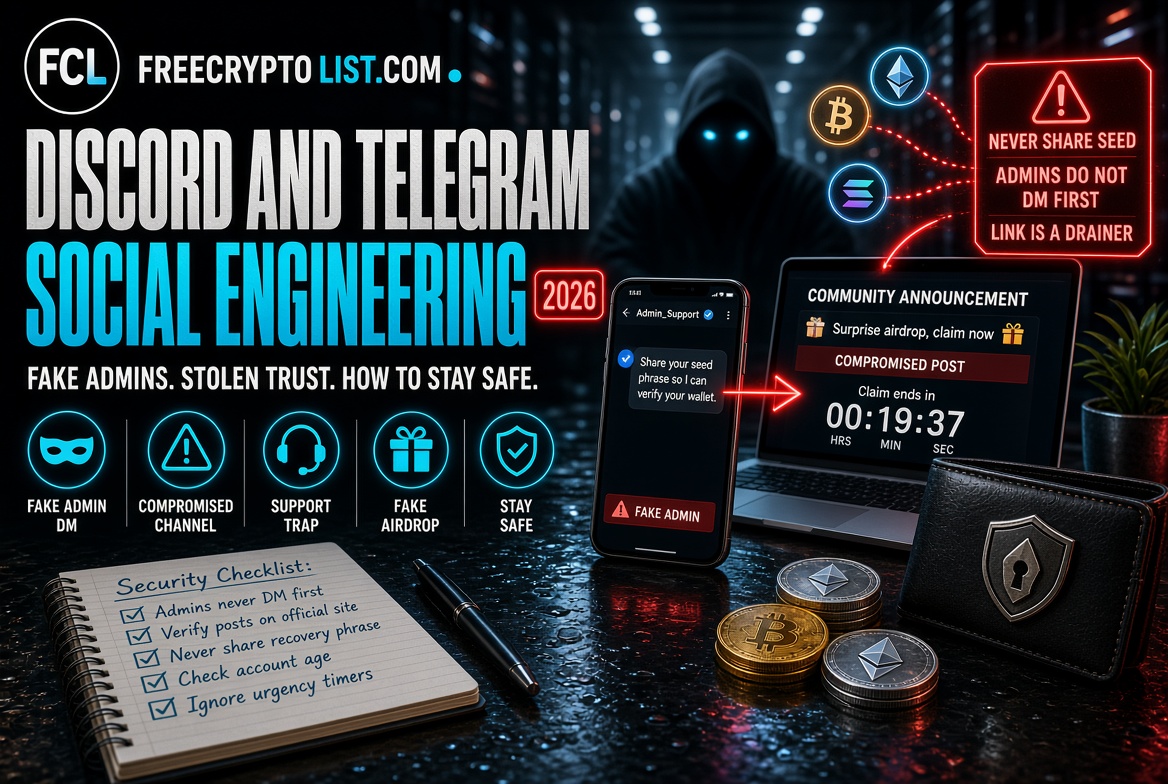
The scammer copies a real admin or moderator’s display name, profile picture, and bio. On both Discord and Telegram, display names can be almost anything – including identical copies of a real moderator’s name – while the underlying username has to be unique. So the impersonator’s username will be slightly different: an extra letter, an underscore, a lowercase “l” where the real one has a capital “I,” or a tacked-on word like “_support” or “_official.”
They join the official server, watch the community, learn the project’s language and recent announcements, and then start DMing members.
The DM usually follows one of a few scripts:
The support scam: “Hi, I noticed you had a question in the support channel. I can help you directly – please share your wallet address and I can verify your eligibility.”
The exclusive opportunity: “We are offering a private whitelist opportunity to early community members. This is not being announced publicly. Click this link to claim your allocation before the window closes.”
The verification requirement: “Your account needs to be verified to continue accessing the server. Please click this link and connect your wallet to complete the process.”
Every script ends the same way – a link to a wallet drainer, a request for your recovery phrase, or a request to sign a transaction. We dissected a real one, word for word, in “You Have a 45% Airdrop Reward Waiting”.
The key defense: Legitimate admins and moderators do not start DMs about financial opportunities, wallet verification, or exclusive offers. If an “admin” DMs you first about anything involving your wallet or money, it’s a scam.
Most legitimate projects pin a message in their official channels saying exactly this: “We will never DM you first.” If you’re unsure whether a message is from a real moderator, ask in the public channel – and compare the username, not just the display name, against the member list.
Attack Pattern 2 – Compromised Official Channels
More sophisticated than impersonation: attackers take control of a legitimate project’s real account or channel and post malicious content from the actual official source.
Discord server compromises happen when an administrator’s account is phished or their login session is stolen. With admin access, the attacker can post announcements and messages that genuinely come from the official server. The attack usually involves a “surprise airdrop” or “emergency migration” announcement with a malicious link, deleted again once enough members have clicked.
Telegram channel hijacks happen when a channel’s owner loses control through phishing or social engineering. We covered this pattern in our fake crypto influencers article – legitimate channels with large followings suddenly posting malicious content after being taken over.
Bot account flooding – attackers deploy automated accounts that join servers and flood channels with malicious links during busy moments. A token launch or major announcement brings in a wave of new members who are less likely to recognize unfamiliar accounts.
How to protect yourself:
- Check whether the announcement also appears on the project’s official X account and website – real announcements are coordinated across channels
- If a Discord or Telegram announcement offers something not mentioned anywhere else, assume it’s fraudulent
- Never click links from Discord or Telegram without first finding the same announcement on the project’s official website, which you reach by typing the address yourself
Attack Pattern 3 – Fake Verification Bots
A newer and nastier twist. You join a group – often after following a link from what looks like a well-known crypto account on X – and you’re greeted by a “verification” bot with a name like Safeguard or Guardian, mimicking the real bots many groups use to keep out spammers.
The fake bot tells you to verify that you’re human within a short time limit. Its “verification” puts a command onto your clipboard and instructs you to paste it into your computer’s Run box or terminal. That command downloads malware built to steal wallet data and private keys. In December 2024, security firm Scam Sniffer documented exactly this campaign using a fake bot called “OfficiaISafeguardBot” (note the capital “I” in place of the lowercase “l”), and reported victims losing millions.
The defense: Real verification bots ask you to tap a button or solve a simple puzzle inside Telegram. No legitimate verification will ever ask you to paste anything into your computer’s Run box, terminal, or command prompt, connect a wallet, or download a file. If it does, leave the group immediately.
Attack Pattern 4 – Pump and Dump Coordination Channels
We covered this in depth in our pump and dump article based on first-hand participation, but it belongs here too because the social engineering mechanics are distinct from simple fraud.
Pump channels on Telegram use community psychology deliberately. The channel builds a sense of insider access – you’re part of a group that gets information others don’t. The urgency language, the countdown timers, the fire emojis from other members, the “react if you want the next call” engagement farming – all of it is designed to create shared excitement that overrides individual judgment.
This is textbook social engineering. The target isn’t just your money – it’s your judgment. The goal is to get you to act before you think.
The channel I joined for research had 4,100 subscribers. Messages promising “500x confirmed 100%” and “1000x MINIMUM” got multiple fire emoji reactions from what looked like engaged members. Whether those reactions came from real people or bot accounts is impossible to verify – but the effect on a new member seeing apparent consensus is the same.
The defense: Any channel that promises guaranteed returns on specific tokens is a pump operation. The word “confirmed” applied to investment returns is a scam signal regardless of context. Leave these channels.
Attack Pattern 5 – The Technical Support Trap
Crypto users run into genuine technical problems all the time – failed transactions, bridging issues, wallet connection errors. When they post about these in public channels, scammers watching those channels respond before real support can.
The fake support agent offers to help via DM. Once in private, they guide the victim through “fixing” the problem – a process that always ends with sharing the recovery phrase, connecting the wallet to a malicious “sync” or “validation” site, or installing a “support tool” that is actually malware.
This attack works because:
- The victim started the interaction by posting publicly about a real problem
- The scammer comes across as helpful rather than predatory
- The technical “solution” is hard for the victim to evaluate
- A stuck transaction makes people willing to follow instructions quickly
The defense: Never accept technical support via DM from anyone who contacts you first. Real support for major protocols happens in public channels, through official ticket systems, or through the help pages on the project’s own website. Any “support” that asks for your recovery phrase is a scam, every time – no legitimate technical issue requires your private keys to fix. If you’re stuck on a bridge, our bridging guide covers the common problems and where to get real help.
Attack Pattern 6 – Fake Airdrop and Whitelist Announcements
Posted through compromised channels, fake admin accounts, or entirely fake project servers, these mimic the format of legitimate airdrop announcements to drive traffic to wallet drainers.
The format is usually:
- An announcement in an active crypto community that a project is running a surprise airdrop or whitelist
- A link to a professional-looking site with the project’s branding
- A wallet connection prompt followed by an approval or signature request
We documented a live example in our fake Flare XRPFi airdrop article – a fake distribution that spread on X but used the same mechanics as the Discord and Telegram versions. What you’re actually agreeing to when you sign on one of these sites is explained in our wallet drainer approvals guide.
The giveaway feature of these attacks is real project branding. The fake site uses official logos, correct colors, and language that matches the project’s style. That isn’t an accident – attackers research their targets.
The defense: Every legitimate airdrop or whitelist is announced across a project’s official channels and confirmed on its official website. A distribution that only appears in one channel doesn’t exist. We track real ones on our Active Airdrops page.
Attack Pattern 7 – Romance, Mentorship, and “Job” Scams
Longer-form social engineering that builds a relationship before making financial requests. We covered the most extreme version in our pig butchering article.
On Discord and Telegram, shorter versions are common – a friendly account builds rapport over days or weeks inside a real community, then introduces an investment opportunity, a “trading mentor,” or a request to help with a transaction that requires you to send crypto first. A close cousin is the fake online job offered in Telegram groups, where you’re paid small amounts for simple tasks before being asked to deposit crypto – see our crypto task scams guide.
The relationship-building phase is what makes this different from straightforward fraud. By the time the financial request arrives, the victim feels they know the person.
The defense: Extended friendly contact from a stranger in a crypto community, followed eventually by financial suggestions, is a recognized scam pattern. Genuine friendships do form in crypto communities – but genuine friends don’t eventually ask you to send crypto to a platform they recommend or connect your wallet to a site they link.
Platform Settings Worth Knowing
On Discord:
- Go to User Settings → Content & Social and turn off Direct Messages from server members in the Social permissions section. You can also change this server by server, so you only allow DMs where you actually need them
- Click any account that DMs you and check “Member Since” on their profile – scam accounts are often only days or weeks old
- Compare the username, not just the display name, against the real admin in the server’s member list
- Keep your own account protected with an authenticator app, and never log in to Discord through a link someone sends you – stolen admin sessions are how servers get hijacked
On Telegram:
- Go to Settings → Privacy and Security → Groups & Channels and set it to “My Contacts” so strangers can’t add you to scam groups
- Set Phone Number to “Nobody” under Privacy and Security, so your number can’t be harvested for targeting
- Premium users can also limit who can start new chats with them under Privacy and Security → Messages
- Check any channel claiming to be official against the username listed on the project’s website. Telegram usernames can only use a-z, 0-9, and underscores, so impersonators rely on extra letters, swapped characters like “l” and “I,” and added words like “_official” – check character by character
The Universal Rules
Across every attack pattern on both platforms, a small set of rules provides reliable protection:
No legitimate project representative will ever DM you first about your wallet, recovery phrase, or an investment opportunity. This is the single most important rule. It has no exceptions.
Recovery phrases are never required for any legitimate support, verification, or claiming process. Any request for your recovery phrase is a theft attempt, no matter who appears to be asking.
No real verification asks you to paste a command into your computer, connect a wallet, or download a file.
Genuine announcements appear across multiple official channels at once. A distribution, whitelist, or opportunity that only appears in one place is almost certainly fake.
Urgency is a manipulation tool. Real opportunities don’t expire in minutes. Countdown timers and “last chance” language are designed to stop you thinking clearly.
Verify links independently. Before clicking any link from Discord or Telegram, type the project’s official URL into your browser yourself and check whether the announcement exists there.
If You Have Already Been Targeted
If you shared your recovery phrase: Your wallet is compromised. Move all remaining assets to a new wallet with a fresh recovery phrase immediately, and treat the old wallet as permanently burned.
If you clicked a link and signed something: Revoke any approvals you don’t recognize on Revoke.cash right away, then move your remaining assets to a fresh wallet.
If you sent crypto: The funds are almost certainly gone. Report it to the FBI at ic3.gov and the FTC at reportfraud.ftc.gov, and report the account on the platform. Ignore anyone who contacts you afterward offering to recover your funds for a fee – that’s a follow-up scam.
If you ran a command or installed software from a “verification” or “support” interaction: Treat the entire device as compromised. From a different, clean device, move your crypto to a new wallet and change your passwords, starting with email. Get the infected computer professionally cleaned or wiped before using it for anything financial again.
Our complete crypto security guide has the full recovery checklist.
Signal or Noise? 🔴 Noise – and the most socially sophisticated noise on this site. Discord and Telegram attacks work because they exploit real communities you’re already part of and trust you’ve already extended. The defense isn’t paranoia – it’s a small number of consistent rules applied every time, no matter how legitimate the source looks.
📖 In This Section Pump and Dump Schemes · Pig Butchering · Crypto Task Scams · Wallet Drainer Approvals
Not about your wallet, recovery phrase, or an investment opportunity. Legitimate admins and moderators don’t start DMs offering support, whitelist spots, airdrops, or wallet verification. If someone who looks like an admin messages you first about any of these, it’s an impersonator, no matter how real the name and profile picture look.
Check the username, not the display name. Display names can be copied exactly, but usernames must be unique, so impersonators use small differences like an extra letter, an underscore, a lowercase l in place of a capital I, or an added word like “_official.” Compare it character by character with the real admin in the member list or on the project’s website, and check how old the account is.
It’s a bot that imitates the real verification bots many Telegram groups use, often under a name like Safeguard. Instead of a simple button, it tells you to paste a command into your computer’s Run box or terminal, which installs malware that steals wallet data and private keys. Real verification never asks you to paste anything into your computer, connect a wallet, or download a file.
Not on its own. Official servers and channels do get hijacked when an admin’s account is compromised. Before clicking any link, check that the same announcement appears on the project’s official X account and website, which you reach by typing the address yourself. A surprise airdrop or migration that only appears in one place is almost certainly fake.
Go to User Settings, then Content and Social, and turn off direct messages from server members in the Social permissions section. You can apply it to all servers or adjust it server by server, so you only allow DMs where you actually need them.
Treat that computer as compromised. From a different, clean device, move your crypto to a new wallet with a new recovery phrase and change your passwords, starting with your email. Don’t use the infected computer for anything financial until it has been professionally cleaned or wiped, and report any losses at ic3.gov if you’re in the US.
Sources: